
Real-time chat
Channels, DMs and threads with reactions, mentions, unread markers and presence over one WebSocket. Search, file uploads, web push and an installable PWA.
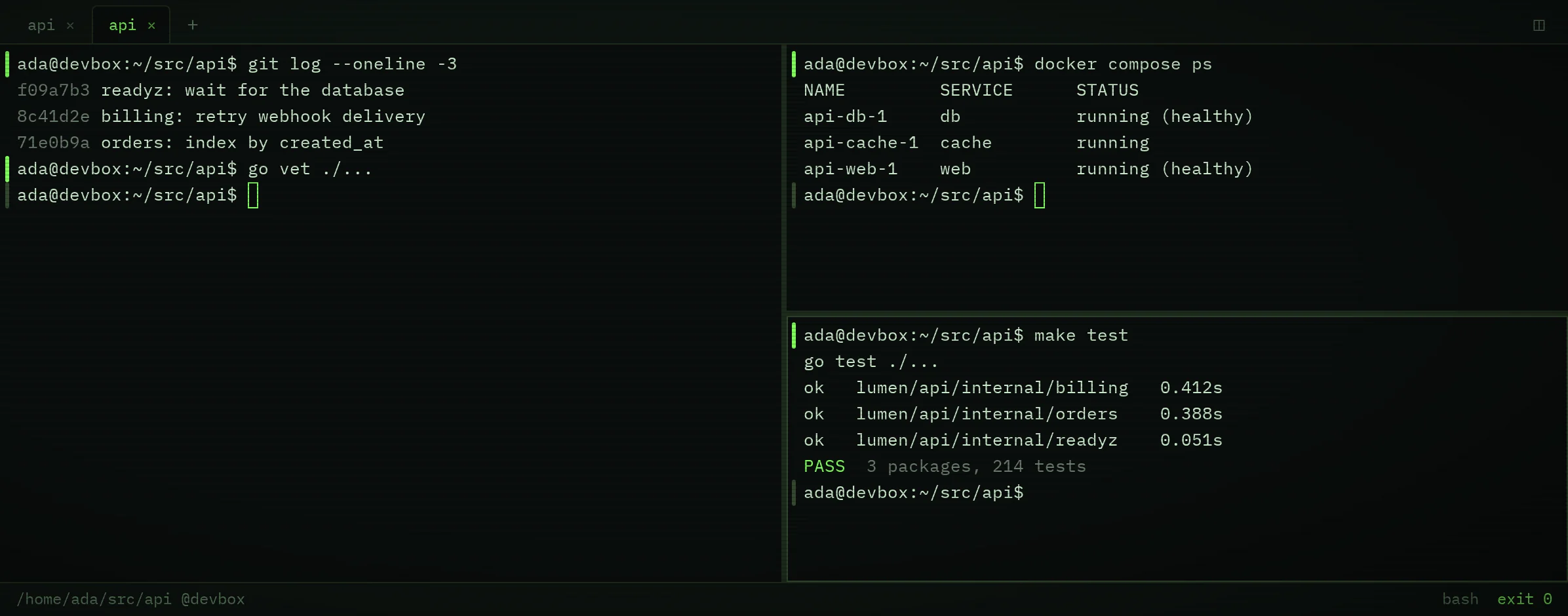
termspace is chat, tasks and wiki for your team, built to self-host, with the source code opening soon. Its desktop app adds a terminal where every command becomes a block you can share, with secrets masked.

Shell integration marks where each prompt, command and output begins and ends, so the terminal knows your commands as units instead of a wall of scrollback.

Send a block to a channel, a task or a wiki page. Your team sees the exact command, exit code and output instead of a cropped screenshot.

The tools a team uses every day share one block document model, so a command block reads the same in a message, a task card or a wiki page.
Channels, DMs and threads with reactions, mentions, unread markers and presence over one WebSocket. Search, file uploads, web push and an installable PWA.

Projects give tasks keys like API-1, and typing a key in chat links it. Kinds, priorities, labels, parents, links, watchers and a full change history.

Page trees you can rearrange, version history with diffs, a trash, backlinks and page links. Restrict viewing or editing per user or group.
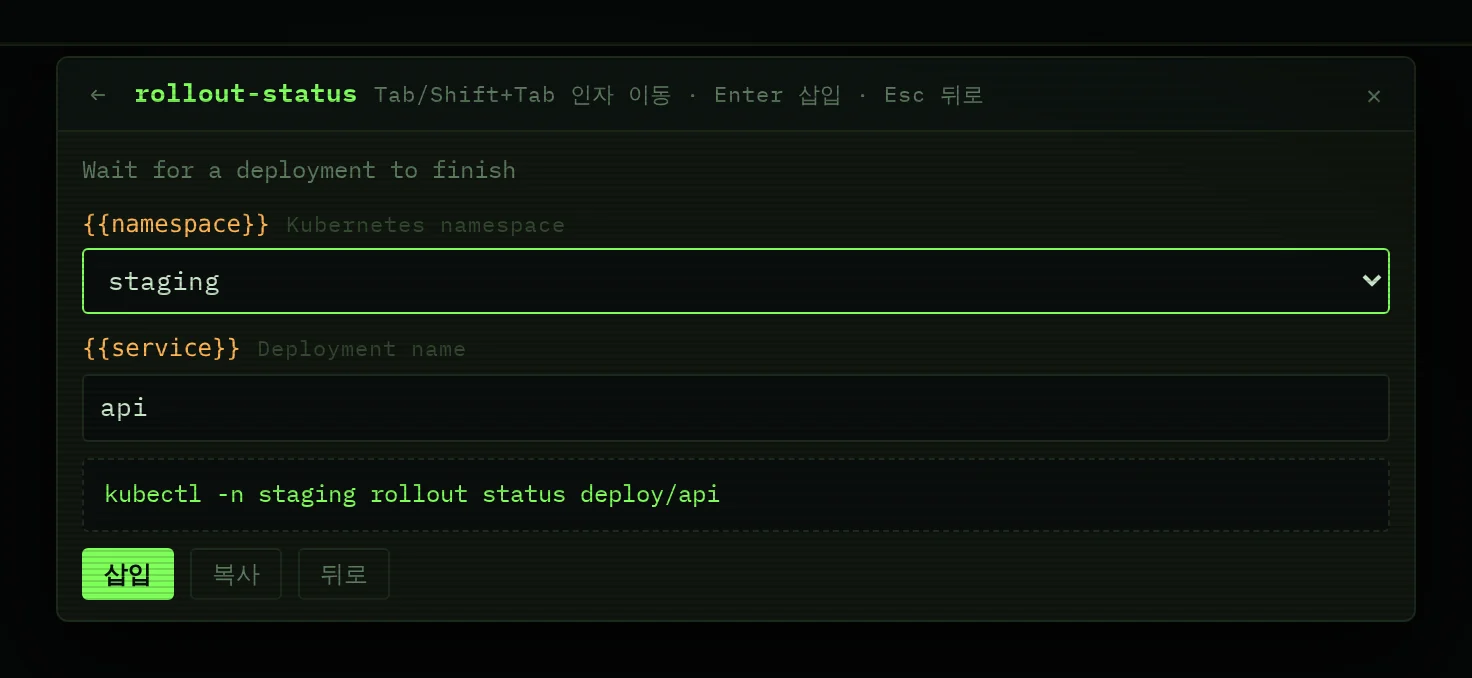
A workflow is a command template with named arguments. Save it once and everyone in the workspace can use it.
Arguments like {{namespace}} become a form with defaults and choices. The finished command goes into your input line and runs only when you press Enter. The TUI client lists the same workflows and copies the result to your clipboard.
The termspace app opens each of your termspace servers in its own window and runs a real shell on your computer, next to your team's chat.
Share a single channel with an affiliate or a partner company. Both companies accept before the channel opens.
Owns the channel and the projects linked to it.
Joins as guests after accepting.
termspace is a single Go binary with PostgreSQL. It runs with Docker Compose or under systemd, and database migrations run on start. The repository and the self-hosting guide open to the public soon; the steps below are what you will run then.
deploy/compose/.env.example to .env.POSTGRES_PASSWORD, for example with openssl rand -hex 24.docker compose up -d --build --wait. The app listens on 127.0.0.1:8080.--profile tls adds Caddy with automatic HTTPS and needs TERMSPACE_DOMAIN pointing at the host, ports 80 and 443 open, plus TERMSPACE_PUBLIC_URL and TERMSPACE_TRUST_PROXY=1. --profile s3 adds MinIO and needs MINIO_ROOT_PASSWORD and the TERMSPACE_S3_* settings.The guide in the repository covers backups, systemd units, upgrades and every TERMSPACE_* setting. Images build for amd64 and arm64.
Quick start, once the repository is public
git clone https://github.com/choibongseok/termspace
cd termspace/deploy/compose
cp .env.example .env && chmod 600 .env
# set POSTGRES_PASSWORD in .env first
docker compose up -d --build --wait
curl -s localhost:8080/readyz   # {"status":"ok"}
What runs
# deploy/compose/docker-compose.yml (excerpt)
services:
  db:
    image: postgres:16-alpine@sha256:aa6c…5139
    environment:
      POSTGRES_USER: termspace
      POSTGRES_PASSWORD: ${POSTGRES_PASSWORD:?…}
      POSTGRES_DB: termspace
    volumes:
      - pgdata:/var/lib/postgresql/data
    # … healthcheck, logging

  termspaced:
    image: ${TERMSPACE_IMAGE:-termspace:local}
    build:
      context: ../..
    depends_on:
      db:
        condition: service_healthy
    # … env_file: .env (every TERMSPACE_* setting)
    environment:
      TERMSPACE_ADDR: ":8080"
      TERMSPACE_DATA_DIR: /data
      TERMSPACE_DATABASE_URL: postgres://termspace:…@db:5432/…
    ports:
      - "${TERMSPACE_HTTP_BIND:-127.0.0.1:8080}:8080"
    # … healthcheck on /readyz, logging

# … caddy (profile tls), minio (profile s3)termspace is built around one rule: the server keeps only what you choose to share, and it never gets a shell.
The server has no terminal route. The desktop app opens the shell on your own computer.
Before a server's pages can start a local terminal, the desktop app asks you to allow that server.
Browser-only users can read shared blocks but cannot run them. Putting a command back into the input line is a desktop feature and never runs it.
Masking runs in the share dialog and again on the server for messages, task descriptions and wiki pages.
The Ctrl+R command history lives on your device and is never sent to the server.
termspace is designed for many companies on one server, with each company as its own tenant.
termspace will follow an open-core model. The open-source edition is meant to be the complete product for teams of any size. Paid editions will add administration, compliance and scale.
Scroll the table sideways to see every edition.
| Feature | Open sourceSelf-hosted, unlimited users | BasicGrowing teams | ProAdmin and security | EnterpriseCompliance and scale |
|---|---|---|---|---|
| Price | Free | Pricing coming soon | Pricing coming soon | Contact us |
| Workspace | ||||
| Chat, threads, reactions and search | Included | Included | Included | Included |
| Tasks and projects | Included | Included | Included | Included |
| Wiki with versions and page permissions | Included | Included | Included | Included |
| Connect channels with other companies | Included | Included | Included | Included |
| Web, PWA, desktop and TUI clients | Included | Included | Included | Included |
| Personal data export | Included | Included | Included | Included |
| Terminal | ||||
| Local terminal with tabs, splits and blocks | Included | Included | Included | Included |
| Share blocks with secret masking | Included | Included | Included | Included |
| Workspace workflows | Included | Included | Included | Included |
| Administration | ||||
| Company-wide workflow library planned | Not included | Included | Included | Included |
| SAML and OIDC single sign-on planned | Not included | Not included | Included | Included |
| Audit log export and retention policies planned | Not included | Not included | Included | Included |
| Terminal admin policies and custom masking rules planned | Not included | Not included | Included | Included |
| SCIM provisioning planned | Not included | Not included | Not included | Included |
| Compliance export and legal hold planned | Not included | Not included | Not included | Included |
| Administration across affiliate companies planned | Not included | Not included | Not included | Included |
Edition boundaries are a proposal and may change before launch, and prices are not set. Nothing is gated today: every feature that exists now works without a license key.
Not yet; it will be. The source code goes public at github.com/choibongseok/termspace. The core license is still being decided and will be announced when the repository opens.
No. The shell runs only inside the desktop app on your computer. From your terminal, the server only receives the blocks and workflows you choose to share.
The command, its exit code, duration and shell, the working directory with your home shown as ~, and the output if you keep it. The output is trimmed to 20,000 bytes. Secrets are masked in the dialog and again on the server. The host name is only included if you turn it on.
Yes. Chat, tasks, wiki and workflow management all work in the browser and as an installable PWA. Shared terminal blocks are read-only there. The terminal itself needs the desktop app.
It is tested on Linux. macOS and Windows builds are experimental, and on Windows the terminal runs without command blocks for now. Installers are not published yet.
Not yet. A hosted cloud is planned. Self-hosting with Docker Compose or systemd comes first.
The open-source edition will be free with unlimited users. Prices for Basic, Pro and Enterprise are not set yet.
A Linux server with Docker, or the binary plus PostgreSQL 16. Attachments go to disk or to S3-compatible storage such as MinIO, Cloudflare R2 or Amazon S3. Put Caddy or another proxy in front for HTTPS.